← All work

Experiment · Warehouse picking app · Field observation

Picnic shipped an update. I tested it from the shelf.

I work part time as a picker at Picnic, a grocery delivery company in Germany. I am also a UX designer. When the picking app changed, I reviewed the update during real shifts and designed what was still missing.

Role
Independent concept, self initiated
Method
Participant observation on shift
Platform
Handheld scanner app
Status
Concept, not affiliated with Picnic
1tap to pick all, at any quantity
2taps to report a shortage
0reversals possible after confirming
3issues observed on shift

01 · Context

One hand on the scanner, one on the groceries.

Pickers walk 15,000 to 25,000 steps a shift, scanner in one hand, items in the other, against a clock. Every extra glance or tap is multiplied by hundreds of picks a day. The app has one job: tell the picker where to go, what to take, how many, and where to put it.

02 · What Picnic changed

A real improvement that moved the wrong thing.

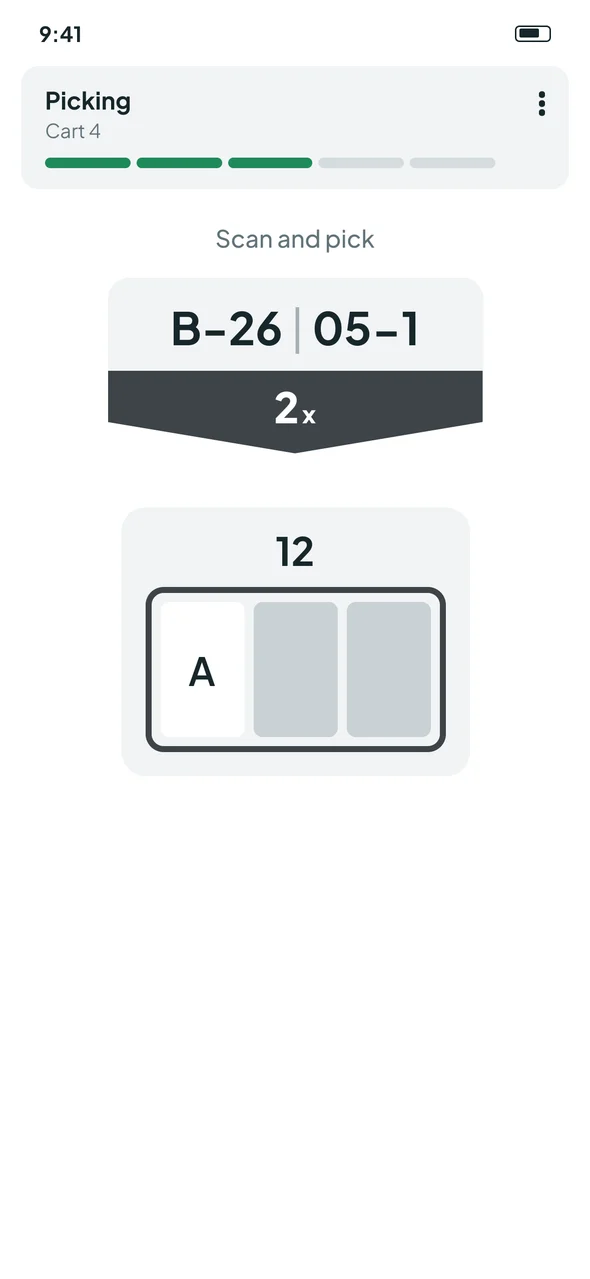
Before the update: a Picking header with cart ID, location B-26 05-1, a large 2x quantity in a dark arrow and a large tote diagram with slot A.
Before
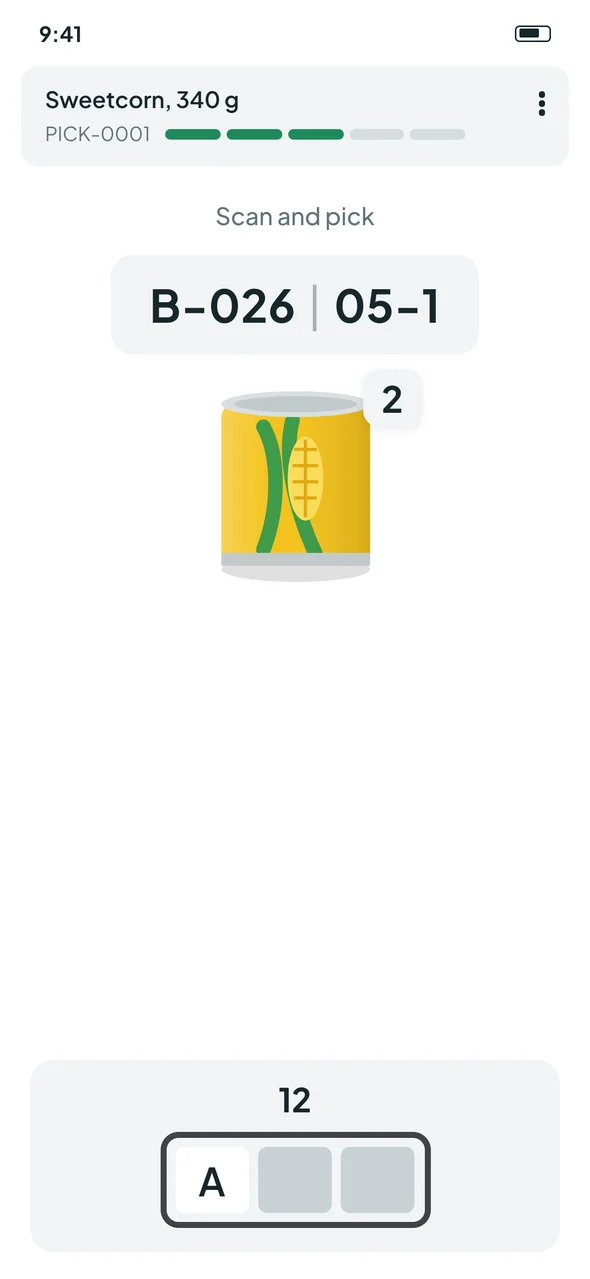
Picnic's update: the product name as header, location B-026 05-1, a product image with a small 2 badge, and a smaller tote diagram.
Picnic's update

Both screens redrawn from memory in a neutral style. No internal screens, data or branding.

BeforePicnic's update
Header"Picking" + cart IDProduct name + pick ID
LocationB-26 | 05-1B-026 | 05-1 (fixed width format)
QuantityLarge "2x" in a dark arrowSmall "2" badge on a product image
ProductNot shownProduct image
ToteLarge tote diagram, slot ASame diagram, smaller

What the update got right

  • Recognition over recall. A product image lets pickers confirm the item before scanning.
  • Consistent location format. B-026 lines up with other three digit aisles, so it reads faster.
  • Meaningful header. The product name replaces a generic title.

What it traded away (my expert read)

  • Quantity lost its weight. The most error critical number moved from a dark full width band to a small badge on the image. At arm's length, a 1 and a 2 matter more than the picture.
  • The tote is still a code. The slot diagram still has to be decoded, and the update made it smaller.

03 · What I observed on shift

Three issues kept coming up.

These are my own observations as a picker, not measured rates.

  1. A toggle that undoes work.The same control confirms a pick and, tapped again in a hurry, silently reverses it.
  2. No path for a shortage.When the shelf has fewer items than ordered, the screen offers no next step, so pickers improvise.
  3. Tote notation that misleads newcomers.Experienced pickers read the tote and slot code instantly. New pickers have to learn it first.

04 · Three rules

Design for the moment with a full cart and a ticking clock.

  1. 1
    Confirmation only moves forward.Once a pick is committed, nothing on screen can reverse it by reflex. Mistakes go through a deliberate "report a problem" path.
  2. 2
    Effort matches the exception, not the quantity.Picking 2 or 48 costs one tap. Only a shortage costs more.
  3. 3
    Describe by destination.Say where the item goes in words, not only as a diagram.

05 · The concept

Three screens, one decision each.

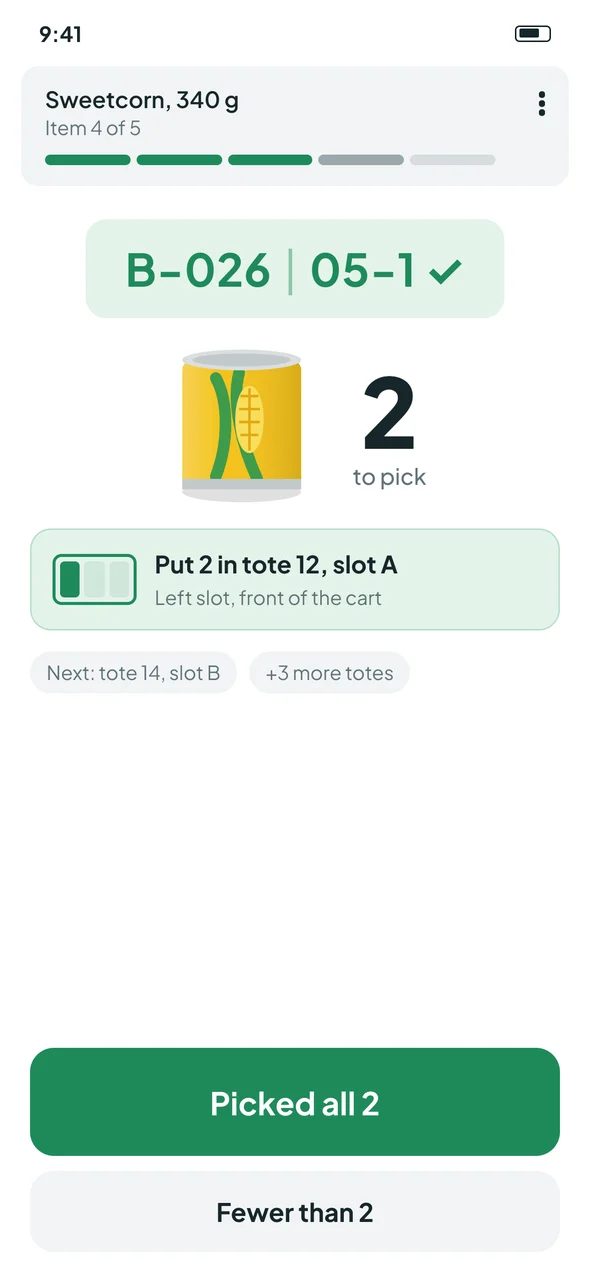
Concept pick screen: the location turns green with a tick after a correct scan, quantity 2 at full weight next to the product image, the line Put 2 in tote 12, slot A with a mini tote and next tote preview, and buttons Picked all 2 and Fewer than 2.

Scan confirms the shelf, one tap confirms the pick.

The location turns green with a tick after a correct scan. Quantity is back to full weight next to the product image, keeping Picnic's improvement. The destination is written out: "Put 2 in tote 12, slot A", with a mini tote and a preview of the next tote. "Picked all 2" is one tap at any quantity; "Fewer than 2" opens the shortage path.
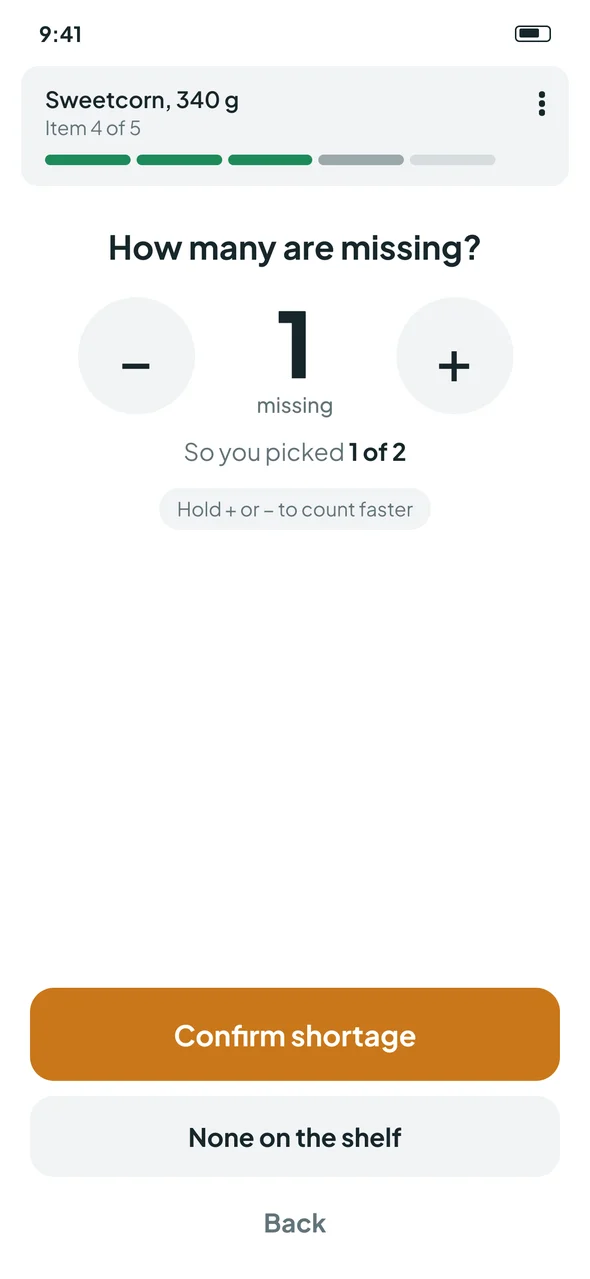
Concept shortage screen: a counter starting at 1 missing, the result in words So you picked 1 of 2, plus and minus buttons that speed up when held, and a None on the shelf option.

Shortages start at 1 missing.

Most shortages are small, so the counter starts at 1 missing and shows the result in words: "So you picked 1 of 2". Holding plus or minus speeds up, so a large order never means dozens of taps. "None on the shelf" is a single tap.

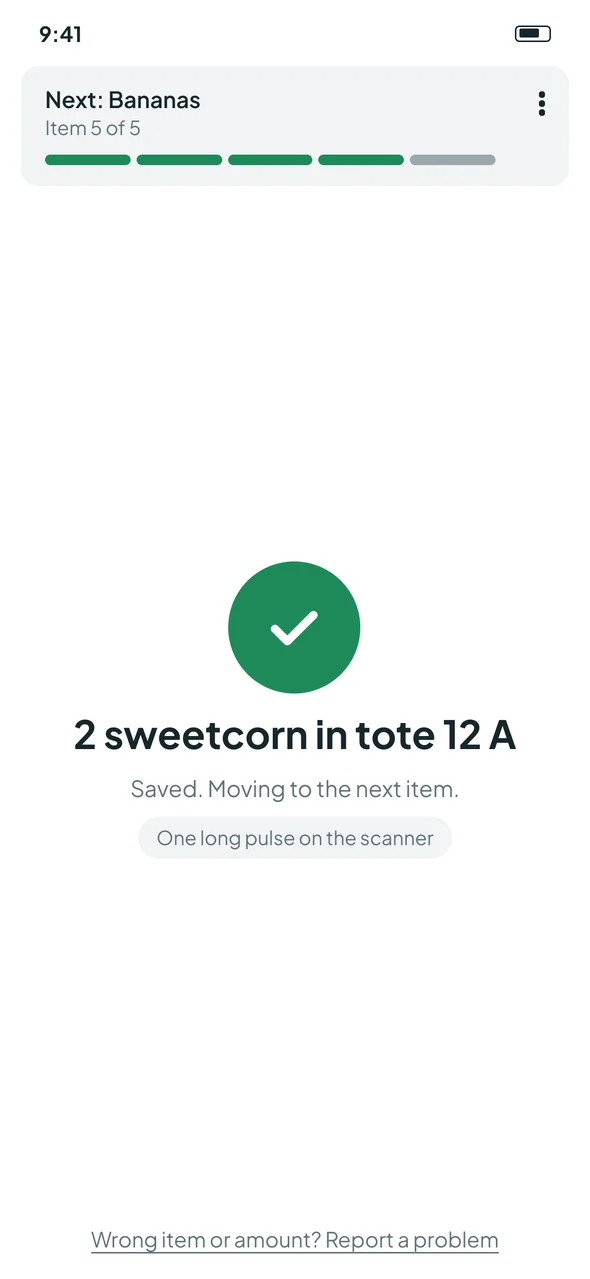
Concept confirmation screen: a clear confirmation that moves on, with no undo toggle and a Wrong item or amount? Report a problem link.

Confirm only moves forward.

A committed pick shows a clear confirmation and moves on. There is no toggle to undo by accident. Corrections go through "Wrong item or amount? Report a problem". Haptics differ by outcome: one long pulse for a pick, a double pulse for a shortage.

06 · By the numbers

Interaction cost, counted from the screens.

Taps after a correct scan, counted from the concept screens. These are design counts, not measured times.

SituationTaps in the concept
Pick all, any quantity (2 or 48)1
Small shortage, 1 missing2 (Fewer than, Confirm)
Shelf empty2 (Fewer than, None on the shelf)
Accidental double tap after confirming0 reversals possible

07 · How I would prove it

Four measures with real pickers.

MeasureWhy
Accidental reversals per shiftTests whether forward only confirmation removes the slip
Time to report a shortageToday there is no defined path
Wrong quantity confirmationsChecks that one tap "picked all" doesn't hide real errors
Newcomer comprehension of the destination lineAsk a new picker what it tells them to do, before training
Still to verify on shiftReal shortage sizes, whether crates carry pack barcodes, and how pickers count today. The starting value of 1 and the hold speed are hypotheses until those numbers exist.

08 · Reflection

Designing from inside the job changes what you notice.

What I learned

  • Designing from inside the job changes what you notice. A desk review would not have caught that the hardest moment is a shortage with a full cart and a ticking clock.
  • A good update can still move the wrong thing. Picnic's product image is a real improvement, but quantity is the number that causes errors, so it needs the most weight.

Next step

  • Share the concept with the Picnic product team and run the four measures above with real pickers.